> ## Documentation Index
> Fetch the complete documentation index at: https://docs.passage.coinlist.co/llms.txt
> Use this file to discover all available pages before exploring further.
# Embed token sales in your app
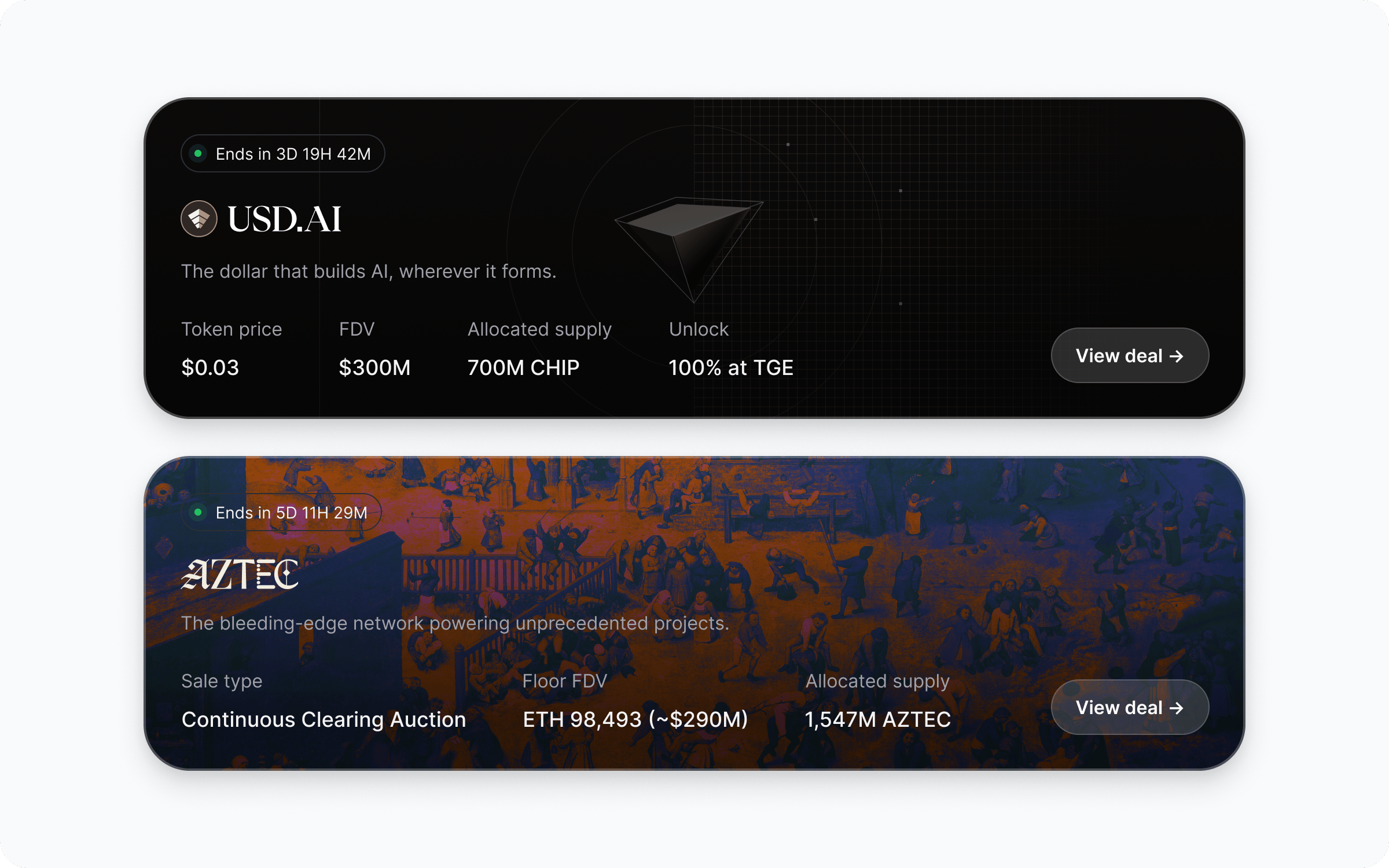
> Surface CoinList-managed token sales directly inside your app. Your users discover and participate in offers without leaving your product - Passage runs the back end.
**Best for:** apps, wallets, and platforms that want to offer token-sale access to their users without becoming a regulated marketplace. You bring the audience and the UI; Passage runs the offering.
## How it works
You integrate the React SDK (or the underlying HTTP API) to render CoinList-managed offers inside your existing app. Users sign in via OAuth, see offers they're eligible for, and complete participation through flows you embed. KYC, eligibility, and payments stay on Passage.
 ## Who handles what
* User KYC and identity verification
* Per-user eligibility for each offer
* Payment collection and settlement
* Token distributions and vesting
* Issuer onboarding and offer compliance
* Investor disclosures and doc signing
* The container app and UX shell
* Which offers to surface to which users
* OAuth client setup and session storage
* Brand-matched UI around the SDK components
* Driving users into the participation flow
## Walkthrough
Reach out to Passage via the [Support portal](https://support.coinlist.co/en/support/tickets/new) to get a `client_id`, `redirect_uri`, and `client_secret` for your app. Store the secret in server-side environment variables - never expose it to the browser.
See [SDK quickstart](/sdk/quickstart#get-oauth-credentials) for the full list of values and where to store them.
Add `@coinlist-co/react` and follow [Set up OAuth authentication](/sdk/oauth-authentication) to add `CoinListProvider`, a sign-in surface, and the callback handler.
```bash theme={null}
npm install @coinlist-co/react
```
Once `getAccessToken` returns a session, the rest of the SDK lights up.
Drop `OffersGrid` (or roll your own UI with `useOffers`) anywhere in your product. You decide what to show, what to filter out, and how the cards link into your detail routes.
```tsx theme={null}
"use client";
import { OffersGrid } from "@coinlist-co/react";
export function MarketplaceSection() {
return router.push(`/offers/${offer.slug}`)} />;
}
```
See [Fetch offers](/sdk/fetch-offers) for layout, filtering, and empty-state options.
### Offer structure
Each offer returned by `useOfferDetails` (or `GET /offers/{id}` in the [API reference](/api-reference)) carries the same fields Passage uses on its own deal pages, so you can replicate the full deal-page experience inside your app. The most relevant fields, and where they typically render:
| Field | Deal-page section |
| ------------------------------------------- | ------------------------------------------------------------------- |
| `name`, `tagline`, `logo_url`, `banner_url` | Hero - project branding and one-line pitch |
| `about` | Long-form project summary |
| `asset` | Token symbol, network, and basic asset metadata |
| `category` | Offer type badge (token sale, equity, etc.) |
| `starts_at`, `ends_at` | Sale timeline and countdown |
| `options` | Individual sale rounds - price, cap, vesting, eligibility per round |
| `funding_assets` | Accepted payment currencies |
| `terms` | Sale terms, agreements, and disclosures shown before participation |
| `milestones` | Project roadmap |
| `faqs` | Project- and offer-specific FAQs |
| `links` | External links - website, docs, socials |
You don't have to render every field; pick the sections that fit your product. At minimum most partners render `name`, `tagline`, `banner_url`, `starts_at`/`ends_at`, and the active `options` so users see what they're buying and when.
On your offer detail page, render offer terms with `useOfferDetails` and link out to the Passage participation flow. Eligibility checks, agreement signing, and payment happen on Passage; users return to your app once done.
See [Display offer details](/sdk/sale-details) and [Track participations](/sdk/participations) for the data you can pull back into your UI.
Use `CoinListClient` (browser) or the server helpers to fetch participation status for the signed-in user and reflect it in your own UI - pending, eligible, completed, failed.
For server-to-server reconciliation, the [API reference](/api-reference) exposes the same data over REST.
## Build it
Get credentials, install `@coinlist-co/react`, and wire your first OAuth session.
Add `CoinListProvider`, a sign-in surface, and a server-backed callback.
Render `OffersGrid` or build a custom layout with `useOffers`.
Pull participation status into your own UI and backend.
## Common questions
OAuth sign-in and the participation flow run through Passage, but discovery, listing, and post-participation status can all live inside your app. Most partners drop users into Passage only for the regulated steps (KYC, eligibility, payment) and bring them back afterward.
Yes. `OffersGrid` and `useOffers` return every offer the signed-in user is eligible to see; you can filter that list by slug, category, or any field on the offer before rendering.
The issuer of each offer remains liable for their offering. Passage runs the compliance, KYC, and distribution infrastructure. Your app is acting as a discovery and UX surface - your account manager will confirm the exact arrangement for your jurisdiction.
Yes. The React SDK is the recommended path, but `CoinListClient` works in any browser environment and the [API reference](/api-reference) covers the underlying HTTP endpoints for non-React or server-side use.
Participation status is available via the SDK for the signed-in user, and via REST for server-to-server reconciliation. Most partners pull a participation summary on session refresh and persist what they need to drive their own UI.
## Who handles what
* User KYC and identity verification
* Per-user eligibility for each offer
* Payment collection and settlement
* Token distributions and vesting
* Issuer onboarding and offer compliance
* Investor disclosures and doc signing
* The container app and UX shell
* Which offers to surface to which users
* OAuth client setup and session storage
* Brand-matched UI around the SDK components
* Driving users into the participation flow
## Walkthrough
Reach out to Passage via the [Support portal](https://support.coinlist.co/en/support/tickets/new) to get a `client_id`, `redirect_uri`, and `client_secret` for your app. Store the secret in server-side environment variables - never expose it to the browser.
See [SDK quickstart](/sdk/quickstart#get-oauth-credentials) for the full list of values and where to store them.
Add `@coinlist-co/react` and follow [Set up OAuth authentication](/sdk/oauth-authentication) to add `CoinListProvider`, a sign-in surface, and the callback handler.
```bash theme={null}
npm install @coinlist-co/react
```
Once `getAccessToken` returns a session, the rest of the SDK lights up.
Drop `OffersGrid` (or roll your own UI with `useOffers`) anywhere in your product. You decide what to show, what to filter out, and how the cards link into your detail routes.
```tsx theme={null}
"use client";
import { OffersGrid } from "@coinlist-co/react";
export function MarketplaceSection() {
return router.push(`/offers/${offer.slug}`)} />;
}
```
See [Fetch offers](/sdk/fetch-offers) for layout, filtering, and empty-state options.
### Offer structure
Each offer returned by `useOfferDetails` (or `GET /offers/{id}` in the [API reference](/api-reference)) carries the same fields Passage uses on its own deal pages, so you can replicate the full deal-page experience inside your app. The most relevant fields, and where they typically render:
| Field | Deal-page section |
| ------------------------------------------- | ------------------------------------------------------------------- |
| `name`, `tagline`, `logo_url`, `banner_url` | Hero - project branding and one-line pitch |
| `about` | Long-form project summary |
| `asset` | Token symbol, network, and basic asset metadata |
| `category` | Offer type badge (token sale, equity, etc.) |
| `starts_at`, `ends_at` | Sale timeline and countdown |
| `options` | Individual sale rounds - price, cap, vesting, eligibility per round |
| `funding_assets` | Accepted payment currencies |
| `terms` | Sale terms, agreements, and disclosures shown before participation |
| `milestones` | Project roadmap |
| `faqs` | Project- and offer-specific FAQs |
| `links` | External links - website, docs, socials |
You don't have to render every field; pick the sections that fit your product. At minimum most partners render `name`, `tagline`, `banner_url`, `starts_at`/`ends_at`, and the active `options` so users see what they're buying and when.
On your offer detail page, render offer terms with `useOfferDetails` and link out to the Passage participation flow. Eligibility checks, agreement signing, and payment happen on Passage; users return to your app once done.
See [Display offer details](/sdk/sale-details) and [Track participations](/sdk/participations) for the data you can pull back into your UI.
Use `CoinListClient` (browser) or the server helpers to fetch participation status for the signed-in user and reflect it in your own UI - pending, eligible, completed, failed.
For server-to-server reconciliation, the [API reference](/api-reference) exposes the same data over REST.
## Build it
Get credentials, install `@coinlist-co/react`, and wire your first OAuth session.
Add `CoinListProvider`, a sign-in surface, and a server-backed callback.
Render `OffersGrid` or build a custom layout with `useOffers`.
Pull participation status into your own UI and backend.
## Common questions
OAuth sign-in and the participation flow run through Passage, but discovery, listing, and post-participation status can all live inside your app. Most partners drop users into Passage only for the regulated steps (KYC, eligibility, payment) and bring them back afterward.
Yes. `OffersGrid` and `useOffers` return every offer the signed-in user is eligible to see; you can filter that list by slug, category, or any field on the offer before rendering.
The issuer of each offer remains liable for their offering. Passage runs the compliance, KYC, and distribution infrastructure. Your app is acting as a discovery and UX surface - your account manager will confirm the exact arrangement for your jurisdiction.
Yes. The React SDK is the recommended path, but `CoinListClient` works in any browser environment and the [API reference](/api-reference) covers the underlying HTTP endpoints for non-React or server-side use.
Participation status is available via the SDK for the signed-in user, and via REST for server-to-server reconciliation. Most partners pull a participation summary on session refresh and persist what they need to drive their own UI.